Building a gaming PC is one of the most rewarding experiences for gamers, but choosing the right PC components can feel overwhelming especially when you’re trying to balance performance, price, and future-proofing. In 2025, the gaming industry has evolved dramatically, offering more options than ever across budget, mid-range, and high-end categories. Whether you’re a first-time builder or an enthusiast upgrading your rig, understanding how each component affects gaming performance is essential.
This guide breaks down the best PC components for every budget tier, helping you build a powerful setup without overspending. From the CPU and GPU to RAM, storage, and cooling, this article will walk you through everything needed for a reliable and optimised gaming experience.
1. Understanding the Core PC Components of a Gaming PC
Before choosing parts, you must understand the major components that impact gaming performance:
✔ CPU
Controls game physics, AI, multitasking, rendering, and overall system speed.
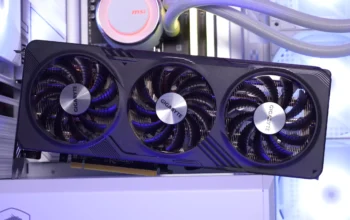
✔ GPU
The most important component for gaming. Determines how many frames per second (FPS) your system can handle.
✔ RAM
Affects loading times, multitasking, and game responsiveness.
✔ Storage
SSD drastically improves game loading speed and system responsiveness.
✔ Motherboard
Ensures compatibility, connectivity, and future upgradability.
✔ Power Supply
Powers your system safely and efficiently.
✔ Cooling System
Maintains temperatures during heavy gaming sessions.
✔ PC Case
Affects airflow, temperatures, and expansion options.
Knowing these parts makes it easier to choose the right gaming PC setup for your budget.
2. Choosing PC Components for a Budget Gaming PC
Ideal for: Casual gamers, beginners, kids, students, and those who want 1080p gaming at medium settings.
Budget: £350–£600 / $400–$700
Best Budget CPU Options
- Intel Core i3 12100F
- AMD Ryzen 3 4100
- AMD Ryzen 5 3600
These CPUs offer great performance without costing too much.
Best Budget GPU Options
For budget builds, GPUs offer the most performance per pound:
- NVIDIA GTX 1650
- NVIDIA GTX 1060 / 1660
- AMD RX 580 / RX 6500 XT
These give smooth performance for games like:
- Fortnite
- Roblox
- Minecraft
- Valorant
- Rocket League
- GTA V
RAM for a Budget Gaming PC
- Minimum: 8GB
- Recommended: 16GB
16GB ensures smoother gameplay and better future-proofing.
Storage Suggestions
- 500GB SSD
Avoid HDD-only setups; they slow down the entire system.
Power Supply
Choose a reliable PSU:
- 450W–550W
- 80+ Bronze certification
Avoid cheap, unbranded PSUs that can damage components.
Motherboard
- B450 (for Ryzen)
- B560 (for Intel)
Affordable, reliable, and supports upgrades.
✔ What to Expect From a Budget Gaming PC
- 1080p gaming
- Medium settings
- Smooth performance for esports titles
- Affordable and upgradeable
This is the best value category for most new gamers.
3. PC Components for a Mid-Range Gaming PC
Ideal for: Gamers who want 1080p or 1440p gaming at high settings, streaming, and content creation.
Budget: £700–£1,200 / $900–$1,400
Mid-range is where gaming PC deliver the longest lifespan and best price-to-performance.
Best Mid-Range CPU Choices
- AMD Ryzen 5 5600X
- Intel Core i5 12400F
- AMD Ryzen 7 5700X
These CPUs give exceptional gaming performance and handle multitasking well.
Best Mid-Range GPUs
- NVIDIA RTX 3060
- NVIDIA RTX 4060
- AMD RX 6600 / 6700 XT
These GPUs can handle:
- 1080p Ultra
- 1440p High
- VR gaming
- Streaming
RAM
- 16GB minimum
- 32GB optional for creators/streamers
Storage
- 1TB NVMe SSD
Faster than SATA SSDs and ideal for modern game sizes.
Power Supply
- 600–750W
- 80+ Bronze or Gold
Motherboard
- B550 (Ryzen)
- B660/B760 (Intel)
These support PCIe 4.0 and future upgrades.
✔ What to Expect From a Mid-Range Gaming PC
- 1080p Ultra settings
- 1440p gaming
- Smooth FPS in demanding AAA games
- Excellent value
- Long-term use for 3–5 years
Mid-range is recommended for most gamers who want powerful performance without spending too much.
4. Choosing Components for a High-End Gaming PC
Ideal for: Competitive gamers, streamers, 4K enthusiasts, professionals, and creators.
Budget: £1,500–£3,000+ / $1,700–$3,500+
High-end builds offer maximum performance and future-proofing.
Best High-End CPUs
- AMD Ryzen 7 7800X3D
- Intel i7 13700K
- Intel i9 or Ryzen 9 for heavy multitasking
These processors excel in gaming, editing, and streaming.
Best High-End GPUs
- NVIDIA RTX 4070 Super
- RTX 4080
- RTX 4090 (ultimate performance)
- AMD Radeon RX 7900 XTX
These GPUs handle:
- 1440p Ultra
- 4K gaming
- Ray tracing
- VR
- AI-enhanced gaming
RAM
- 32GB DDR4/DDR5
High-speed RAM improves performance in CPU-heavy games.
Storage
- 1TB–2TB NVMe Gen 4 SSD
- Optional secondary SSD for extra storage
Power Supply
- 850W–1000W
- 80+ Gold or Platinum
High-end GPUs require strong power stability.
Motherboard
- X670 (for Ryzen)
- Z690/Z790 (for Intel)
These boards include premium features like:
- PCIe 5.0
- Overclocking
- High-speed networking
- Advanced cooling support
✔ What to Expect From a High-End Gaming PC
- 1440p and 4K gaming
- Maximum FPS
- Ray tracing at high settings
- Exceptional multitasking
- Future-proof for 5–7 years
This tier is perfect for enthusiasts, hardcore gamers, and creators.
5. Choosing the Right Gaming PC Based on Your Needs
✔ For Casual Gamers
Choose a budget setup with GTX 1650-level GPU.
✔ For Competitive Gamers
Choose a mid-range setup with RTX 3060/4060.
✔ For Streamers & Creators
Choose a high-end setup with RTX 4070 or higher.
✔ For 1080p Gaming
Budget or mid-range builds work perfectly.
✔ For 1440p Gaming
Mid-range or high-end GPUs recommended.
✔ For 4K Gaming
Choose RTX 4080 or RTX 4090-level GPUs.
6. Future-Proofing Tips for Your Gaming PC Build
To maximise long-term value:
- Choose a motherboard with PCIe 4.0/5.0
- Select a PSU with some extra wattage
- Choose a case with excellent airflow
- Prioritise 16GB–32GB RAM
- Use NVMe SSD storage
- Select a GPU capable of next-gen games
Future-proofing reduces upgrade costs later.